How Local Restaurants Can Promote Seasonal Specials With Simple AI Video Storyboards
Seasonal restaurant specials are hard to promote because they change quickly. A steakhouse may need to talk about a family meal, an early dine offer, a catering tray, a holiday special, or a limited-time dessert before the team has time to produce a full video. That is where a simple storyboard can help.
A storyboard does not need to be a film-school document. It can be three planned shots: the item, the setting, and the reason to act. With a Seedance 2.5 AI, that small plan can become a short test clip before the restaurant decides what to publish.
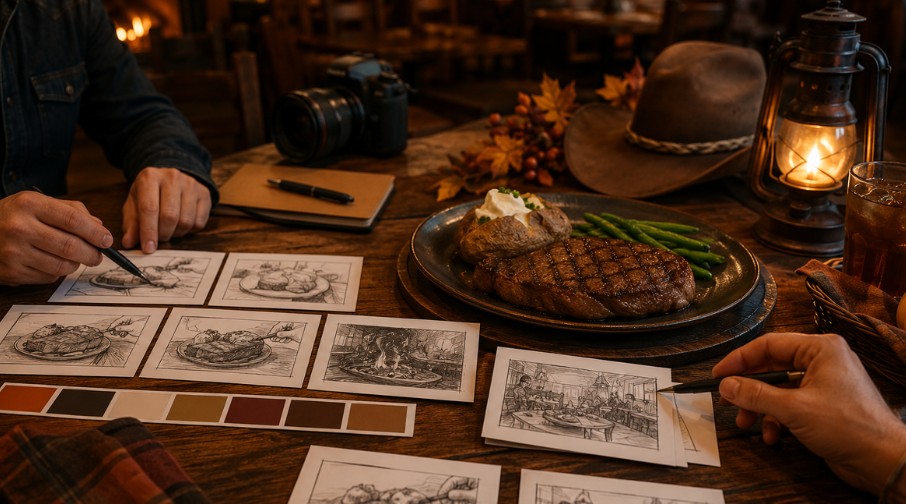
Storyboard illustration: a seasonal restaurant special planned as three short shots.
Start with the offer, not the effect
Seasonal posts fail when the effect comes before the message. A dramatic zoom or cinematic lighting will not help if the viewer cannot tell what is being promoted. Start by writing the offer in plain language: family meal for a weekend dinner, early dine reminder, happy hour snack, catering tray for an office lunch, or dessert for a holiday visit.
Once the offer is clear, choose the scene. A family meal can sit on a table with warm lighting. A catering tray can be shown from above. A happy hour item can use a bar or appetizer setting. The scene should support the offer instead of competing with it.
Build a three-shot plan
A useful restaurant storyboard can be very short. Shot one shows the item or table. Shot two adds a small movement, such as a slow pan or push-in. Shot three gives the customer context: family dinner, lunch break, game night, office catering, or weekend treat.
You can turn that into a prompt like: “Three-shot vertical restaurant video, warm steakhouse table, slow push-in on family meal, close-up of sides, final shot of table ready for dinner, cozy evening mood, no text.” This kind of prompt is specific enough to guide motion without inventing a complicated story.
Use AI video for concept testing
A Seedance 2.5 video generator is most useful at the concept stage when the team wants to see whether an idea has visual energy. It can help compare a close-up product clip with a lifestyle clip or a simple tabletop storyboard. That saves time before anyone books a shoot, edits footage, or asks staff to stage a scene.
The output does not have to replace real restaurant footage. It can help the team decide which angle is worth making, which caption is clearer, and which seasonal idea feels strongest.
Workflow visual: special, audience, scene, camera move, and final review before posting.
Keep food claims and timing clear
Seasonal specials often involve local availability, changing prices, and date windows. A video should not create confusion around those details. Avoid prompts that add fake signs, fake menus, or invented price tags. Put practical information in the post caption or blog text where it can be edited and checked.
If the clip supports a menu page, make sure the surrounding article explains that prices and availability can vary. The video should attract attention. The page should carry the details.
Four storyboard templates restaurants can reuse
For a family meal, use a wide table shot, a slow pass across sides, and a cozy final frame. For happy hour, use an appetizer close-up, a drink or table detail, and a quick social setting. For catering, use an overhead tray shot, a clean office lunch scene, and a group-ready layout. For dessert, use a close-up texture shot, a gentle camera move, and a warm finishing frame.
These templates keep each clip focused. They also make it easier to brief someone else on what to generate, film, or edit.
Review like a customer
Before posting, ask whether the viewer can understand the special in five seconds. Does the food look realistic? Is the setting appropriate for the restaurant? Does the clip avoid fake signage or misleading claims? Does the caption explain the date, location, or availability if needed?
If the video looks beautiful but the offer is vague, rewrite the prompt around the customer decision. A seasonal special only works when the viewer knows why it matters now.
A simple example workflow
For an early dinner special, the storyboard might be three shots: a wide table setting, a close-up of the main plate, and a cozy final frame with sides visible. That plan gives the prompt enough direction without requiring a long script. If the output feels too cinematic or vague, the team can remove extra effects and focus on the table and food.
For catering, the storyboard should be cleaner and more practical: overhead tray shot, neat serving setup, and group-ready context. The goal is to help a reader imagine the use case. A short generated clip can test that angle before the restaurant invests in a real catering shoot.
For a restaurant guide, this approach works best when the video supports a specific page: catering, happy hour, early dine, family meals, or seasonal specials. The article can explain the details and limitations, while the video creates a quick visual preview. That division keeps the post helpful and trustworthy.
The practical takeaway
Local restaurants do not need a complex production plan for every seasonal update. They need a clear offer, a three-shot storyboard, a simple motion prompt, and a careful review. AI video can make that process faster, but the restaurant still controls the message.
A restaurant team can also keep the Seedance 2.5 prompt guide open while writing storyboard prompts, so each shot has a subject, motion, setting, and review rule.
